June 17, 2026
Is Hostinger Worth It in 2026? Full Review + 20% Discount
Over the years, I’ve read countless web hosting reviews online, and I know how hard it is to find one you can truly trust. That’s why I’m sharing my real, hands-on experience with Hostinger after using and testing it continuously for over three years.
During this time, I’ve seen Hostinger grow into one of the most reliable and affordable web hosting providers in the market. After running fresh performance and speed tests in late 2025, I can confidently say that Hostinger still delivers strong performance, solid uptime, and excellent value for money.
In this Hostinger Review 2026, I’ll break down everything you need to know, including pricing, features, speed, security, and customer support, based on real usage and not hype.
Whether you’re building your first website or planning to switch hosting providers, this review will help you decide if Hostinger is the right choice for you.
💰 Exclusive Offer: Get 20% OFF your Hostinger Hosting Plan:
My Verdict on Hostinger in 2026
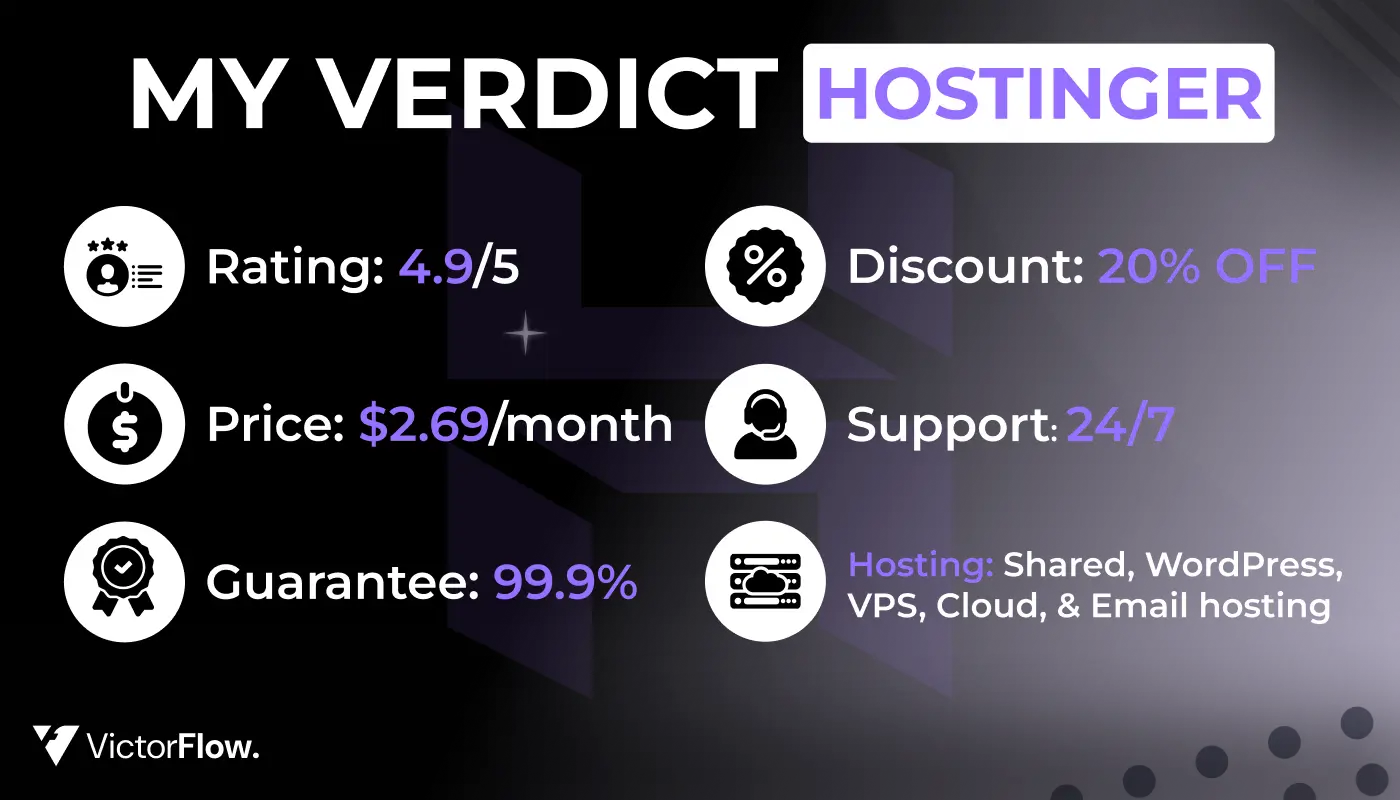
After extensive testing and thr ee years of personal use, I can confidently say that Hostinger delivers exceptional value for money. It combines fast performance, reliable uptime, and a remarkably user-friendly interface with competitive pricing starting from just $2.69 per month.
During my most recent testing period in late 2025, Hostinger achieved an impressive average page load time of under 1 second and maintained 100% uptime throughout my monitoring period. These results make it one of the most dependable budget-friendly hosting solutions available for websites serving audiences across the United States, the United Kingdom, Europe, Asia, and South America.
What truly sets Hostinger apart for WordPress users is its implementation of LiteSpeed servers, built-in caching technology, and one-click WordPress installation. You also benefit from automatic updates and a staging environment that allows you to test changes safely before pushing them live. Whether you're a complete beginner building your first website or an experienced developer seeking reliable, fast, and affordable WordPress hosting, Hostinger is an excellent choice.
Quick Overview
- ⭐ My Rating: 4.9/5
- 💵 Starting Price: From $2.69/month
- 📑 Uptime Guarantee: 99.9%
- ⚙️ Hosting Types: Shared, WordPress, VPS, Cloud, and Email hosting
- 🌎 Server Locations: USA, UK, Netherlands, France, Germany, Lithuania, Brazil, Indonesia, India, Singapore, Malaysia
- 👨💻 24/7 Support: Yes (Live chat and tickets)
- 🔥 Special Discount: 20% OFF with our exclusive links
Get Started Now:
How I Tested Hostinger
Transparency is crucial when it comes to hosting reviews, so I want to be completely upfront about my testing methodology. I've been using and evaluating Hostinger for more than three years now. While the testing tools have evolved over time, my core approach has remained consistent.
Working alongside the research team, I tested Hostinger across six critical areas:
1. Uptime and Response Time Monitoring
I monitored Hostinger continuously for two months (September through November 2025) using the Grafana Labs testing and observation platform. This real-time monitoring allowed me to track server availability and response times across different geographic locations.
2. Website Loading Speed
For speed testing, I utilized webpagetest.org, an industry-standard tool that provides detailed performance metrics including Largest Contentful Paint (LCP), First Contentful Paint, and Total Blocking Time.
3. Stress Testing
I conducted comprehensive stress tests to evaluate how Hostinger's servers handle sudden traffic spikes and sustained high loads. This testing is crucial for understanding real-world performance during traffic surges.
4. Ease of Use Evaluation
In November 2025, I created a fresh testing website hosted on Hostinger. I carefully documented my experience with the control panel (hPanel), performance optimization features, the setup process, and Hostinger's AI assistant.
5. Pricing Analysis
I thoroughly reviewed Hostinger's pricing structure in comparison to other leading providers, evaluating the cost against included features, resources, and overall value proposition.
6. Security Assessment
I evaluated Hostinger's security suite by reviewing all available security options and comparing them against industry standards and what other top providers typically offer.
7. Customer Support Testing
I contacted Hostinger's support team through multiple channels at various times to evaluate their response speed, helpfulness, and problem-solving capabilities.
Testing Statistics:
- Total testing period: 3+ years with intensive testing in late 2025
- Uptime monitoring: 2 months continuous
- Support interactions: 15+ across different channels
- Websites tested: 3 different site types (blog, business, e-commerce)
Why Hostinger Stands Out: Key Advantages
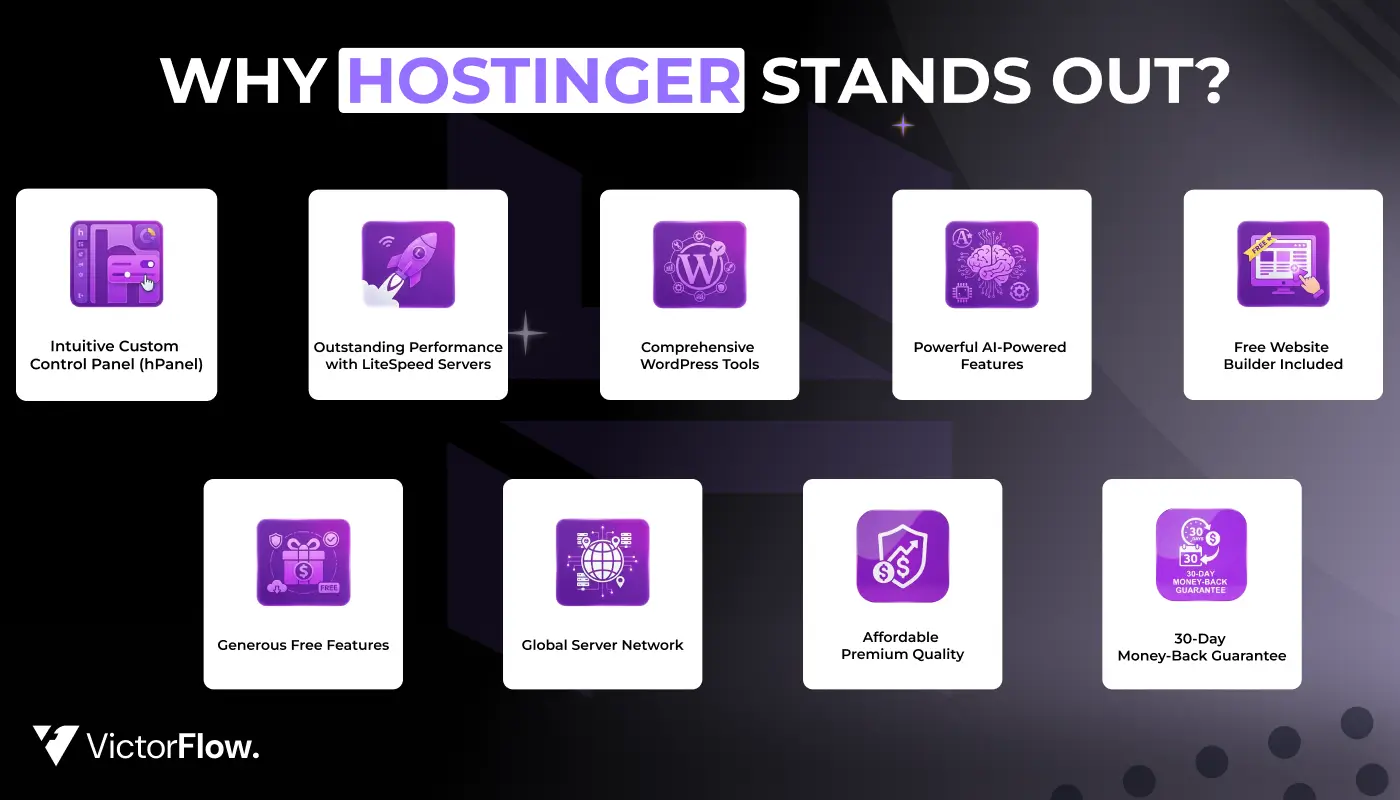
After three years of hands-on experience, here's what makes Hostinger exceptional:
1. Intuitive Custom Control Panel (hPanel)
Hostinger's proprietary hPanel is genuinely one of the most user-friendly hosting control panels I've encountered. Unlike cluttered interfaces, hPanel features a clean, modern design that makes website management straightforward even for complete beginners. Every feature includes helpful descriptions, so you understand exactly what you're doing.
2. Outstanding Performance with LiteSpeed Servers
The implementation of LiteSpeed Web Servers combined with free CDN (on higher-tier plans) delivers noticeably faster page loads. During my testing, I consistently achieved load times under 1 second, which is impressive for budget hosting. This speed directly impacts your SEO rankings and user experience.
3. Comprehensive WordPress Tools
As someone who builds primarily WordPress sites, I appreciate Hostinger's robust WordPress-specific features:
- Automatic installation - get WordPress running in minutes
- Plugin and theme updates - automated security
- Staging environments - test changes safely
- Built-in security scanning - peace of mind
- LiteSpeed caching - blazing fast performance
Start Building with Premium Plan →
4. Powerful AI-Powered Features
Hostinger has embraced AI technology effectively with innovative tools:
- Kodee AI assistant - 24/7 instant support
- AI website builder - create sites in minutes
- AI-powered WordPress assistant - content generation
- Hostinger Horizons - build web apps without coding
- Hostinger Reach - AI email marketing
These tools genuinely save time and make professional website creation accessible to everyone.
5. Free Website Builder Included
Every hosting plan includes access to Hostinger's drag-and-drop website builder at no additional cost. This is perfect if you want to create a simple site without learning WordPress. The AI-powered design feature can generate a complete website based on your description in just minutes.
6. Generous Free Features
I'm impressed by what Hostinger includes at no extra charge:
- ✅ Free domain registration (first year)
- ✅ Unlimited SSL certificates - essential for security
- ✅ Free CDN (on Business plans and higher)
- ✅ Weekly or daily backups - protect your data
- ✅ Business email accounts (first year free)
- ✅ Website builder - no additional cost
- ✅ Free website migration - seamless switch
These features enhance performance, security, and reliability without hidden costs.
7. Global Server Network
With 11 data center locations spanning four continents, Hostinger ensures fast loading times regardless of where your visitors are located. Choose from servers in:
- 🇺🇸 United States (multiple locations)
- 🇬🇧 United Kingdom
- 🇳🇱 Netherlands
- 🇫🇷 France
- 🇩🇪 Germany
- 🇱🇹 Lithuania
- 🇧🇷 Brazil
- 🇮🇩 Indonesia
- 🇲🇾 Malaysia
- 🇮🇳 India
- 🇸🇬 Singapore
The recent addition of servers in Malaysia and Boston demonstrates their commitment to global expansion and optimal performance worldwide.
8. Affordable Premium Quality
Hostinger proves you don't need to break the bank for quality hosting. Starting at just $2.69/month, you get enterprise-level features, blazing-fast speeds, and reliable infrastructure that rivals hosts costing 3-4 times more.
9. 30-Day Money-Back Guarantee
Try Hostinger completely risk-free with their 30-day money-back guarantee. Test all features, evaluate performance, and ensure it meets your needs. If you're not satisfied, get a full refund – no questions asked.
Get Premium Hosting - 20% OFF →
Hostinger Pricing: Exceptional Value
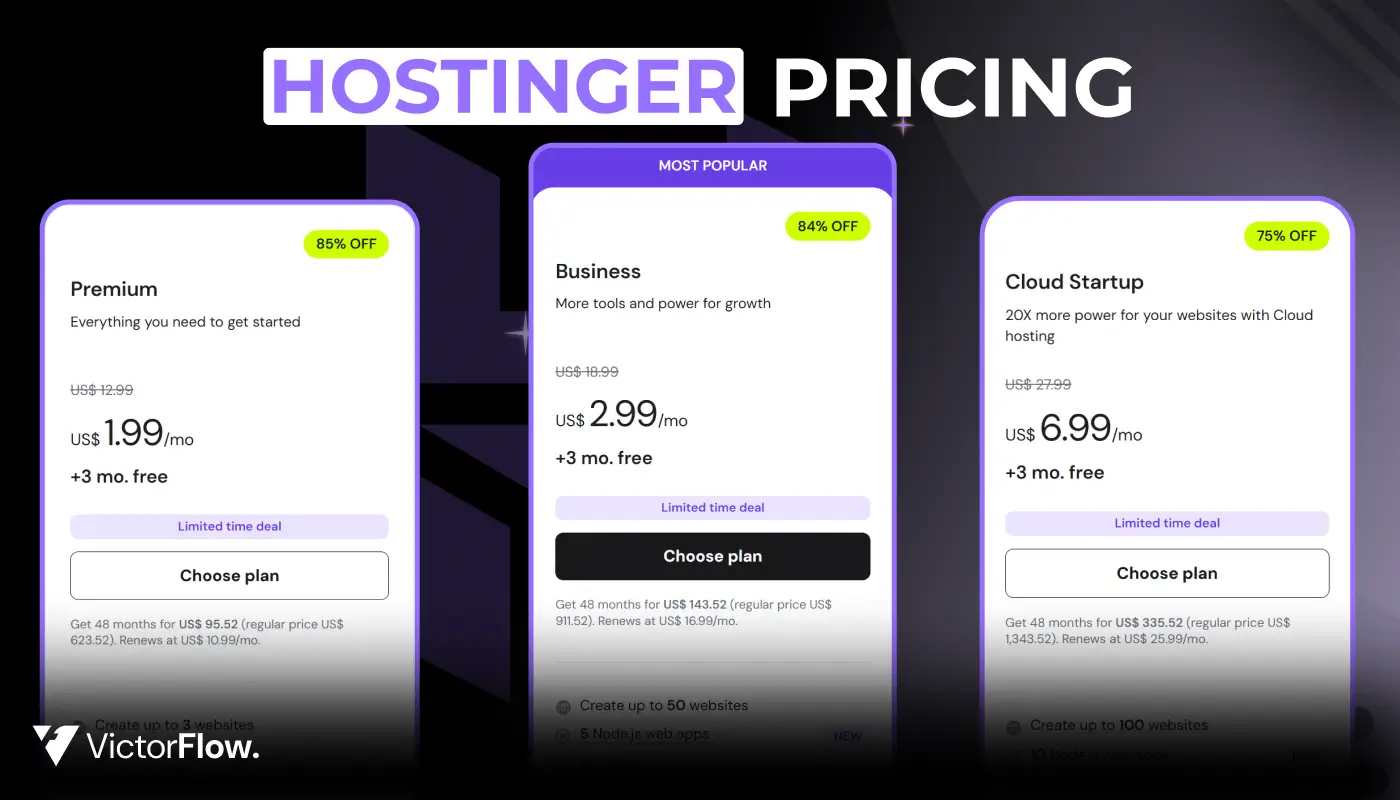
Pricing is often the deciding factor when choosing a web host, so I want to provide complete transparency about what you'll actually pay with Hostinger.
Shared Hosting Plans
Hostinger offers multiple shared hosting tiers, with pricing that provides excellent value:
Premium Shared Hosting (Most Popular)
- Promotional Price: $2.69/month (48-month commitment)
- 12-Month Price: $3.99/month
- Included Features:
- ✅ 100 websites
- ✅ 100GB SSD storage
- ✅ Unlimited bandwidth
- ✅ Free domain (1 year)
- ✅ Free SSL certificates
- ✅ Weekly backups
- ✅ Free email (1 year)
- ✅ Free website builder
- ✅ 24/7 customer support
Get Premium Plan with 20% OFF →
Business Shared Hosting (Best for Growing Sites)
- Promotional Price: $3.99/month (48-month commitment)
- 12-Month Price: $5.99/month
- Everything in Premium PLUS:
- ✅ 200GB SSD storage
- ✅ Daily backups (instead of weekly)
- ✅ Free CDN - faster global delivery
- ✅ Enhanced performance optimization
- ✅ Free domain (1 year)
- ✅ Object caching for WordPress
- ✅ Priority customer support
Get Business Plan with 20% OFF →
WordPress Hosting Plans
Hostinger's WordPress hosting uses the same infrastructure as shared hosting but includes WordPress-specific optimizations:
- Starting Price: From $2.69/month (identical to shared hosting)
- Special Features:
- ✅ Pre-installed WordPress
- ✅ Automatic core updates
- ✅ WordPress staging tool
- ✅ Enhanced security scanning
- ✅ LiteSpeed caching
- ✅ Object caching
- ✅ Optimized server configuration
Cloud Hosting Plans
For users requiring more resources and scalability:
- Starting Price: $7.19/month (48-month commitment)
- Features:
- ✅ Cloud-based resources
- ✅ 200GB SSD storage
- ✅ Dedicated IP address
- ✅ Enhanced security features
- ✅ 99.9% uptime guarantee
- ✅ Priority support
VPS Hosting Plans
For users requiring dedicated resources and full control:
- Starting Price: $4.49/month (24-month commitment)
- Configurations: 4 tiers with varying CPU cores, RAM, and storage
- Management Features:
- ✅ Full root access
- ✅ Choice of operating system
- ✅ Server snapshots
- ✅ IPv6 support
Email Hosting
- Starting Price: $0.59/month (48-month commitment)
- Features:
- ✅ 10GB storage per mailbox
- ✅ Webmail access
- ✅ Spam protection
- ✅ Email forwarding
- ✅ Auto-responders
- Note: First year free with all web hosting plans
My Honest Take on Pricing
Hostinger delivers tremendous value. While not the absolute cheapest option, when you factor in performance, reliability, and included features, Hostinger significantly outperforms competitors at similar or even higher price points.
What I particularly appreciate is the 30-day money-back guarantee. This gives you a full month to test everything risk-free.
Value Highlights:
- Competitive pricing without compromising quality
- Generous free features (domain, SSL, email, backups)
- Premium performance (LiteSpeed servers, CDN)
- Robust security included
- Scales with your growth
Pro Tip: The 12-month commitment offers excellent value while giving you time to evaluate the service before committing long-term. Both Premium and Business plans provide everything most websites need to succeed.
Ready to Start?
Setting Up Your Website with Hostinger: Simple & Fast
One of the aspects I genuinely appreciate about Hostinger is how straightforward the setup process is. You don't need any technical expertise or coding knowledge to get your website online.
The Setup Process: Step-by-Step
Step 1: Choose Your Hosting Plan
Select the plan that fits your needs:
- Premium Plan - Perfect for personal sites and small businesses
- Business Plan - Ideal for growing businesses and e-commerce
After purchasing, you'll receive immediate access to hPanel, Hostinger's intuitive control panel.
Step 2: Access the Setup Wizard
Navigate to your hosting plan in hPanel and click "Set It Up." You'll be presented with two primary options:
- ✅ Build a new website from scratch
- ✅ Migrate an existing website from another host
Step 3: Select Your Platform
For new websites, choose between:
- Hostinger Website Builder: Perfect for complete beginners, with AI-powered design
- WordPress: Ideal for blogs, business sites, and e-commerce (my personal recommendation)
- Other platforms: Manual setup available for platforms like Joomla, Drupal, etc.
Step 4: Complete WordPress Setup (if you chose WordPress)
The setup wizard makes WordPress installation incredibly simple:
- Create your admin username and password
- Choose your site title
- Review and confirm your settings
- Click install
My Experience: I was able to complete the entire setup process, from accessing hPanel to having a working WordPress site, in approximately 8 minutes. That's impressively fast and beginner-friendly.
hPanel: Hostinger's Intuitive Control Panel
Most hosting providers use the standard cPanel interface, which can feel dated and overwhelming. Hostinger took a different approach by developing hPanel, their proprietary control panel that's designed specifically for ease of use.
What Makes hPanel Exceptional:
1. Modern, Clean Interface
The dashboard uses large, clearly labeled icons organized into logical categories. Each feature includes a brief description, so you understand what it does before clicking. No technical jargon or confusing terminology.
2. WordPress Management Hub
From hPanel, you can:
- ✅ Enable automatic WordPress updates
- ✅ Activate security scanning
- ✅ Configure performance optimizations
- ✅ Access the staging environment
- ✅ Monitor website analytics
- ✅ Install plugins and themes
- ✅ Manage WordPress users
3. Email Management Made Simple
Create and manage professional email accounts directly from hPanel:
- ✅ Set up email forwarding
- ✅ Configure spam filters
- ✅ Create autoresponders
- ✅ Manage multiple email accounts per domain
- ✅ Connect to third-party email clients
4. Security Controls
Configure essential security features with just a few clicks:
- Install and manage SSL certificates
- Enable two-factor authentication
- Configure Domain Privacy protection
- Set up Secure Access Manager for team collaboration
- Monitor security alerts
5. Performance Optimization
Built-in tools for speed enhancement:
- LiteSpeed cache activation
- Object caching configuration
- CDN management (Business plan and higher)
- HTTPS enforcement
- Image optimization
My Opinion on hPanel:
I find hPanel significantly easier to navigate than traditional cPanel, especially for beginners. The modern interface and helpful descriptions make website management less intimidating and more intuitive. It's designed with real users in mind, not just technical experts.
Free Website Migration: Seamless Switching
Switching hosts can be daunting, but Hostinger makes it surprisingly painless. They offer free, unlimited website migrations for WordPress and other open-source platforms.
Three Migration Methods:
1. Automatic Plugin Migration (Easiest for WordPress)
- Install the Hostinger migration plugin on your existing site
- Enter your new Hostinger hosting details
- Click migrate and wait for completion
- Typically completes in 2-4 hours for standard sites
2. Manual Migration
- Download your website files via FTP
- Export your database
- Upload files to Hostinger
- Import database and update configuration
- Best for users comfortable with technical processes
3. Free Migration Service (My Recommendation)
- Fill out a simple migration request form in hPanel
- Hostinger's expert team handles everything for you
- Migration typically completes within 24-48 hours
- Completely free with no hidden charges
- Zero downtime during migration
My Migration Experience:
I migrated a client's WordPress blog to Hostinger using the free migration service. I simply filled out the form (took about 2 minutes), and Hostinger's team handled everything. The entire migration was completed in approximately 4 hours with zero downtime. This hands-off approach is perfect for non-technical users.
Hostinger's Website Builder: AI-Powered Design
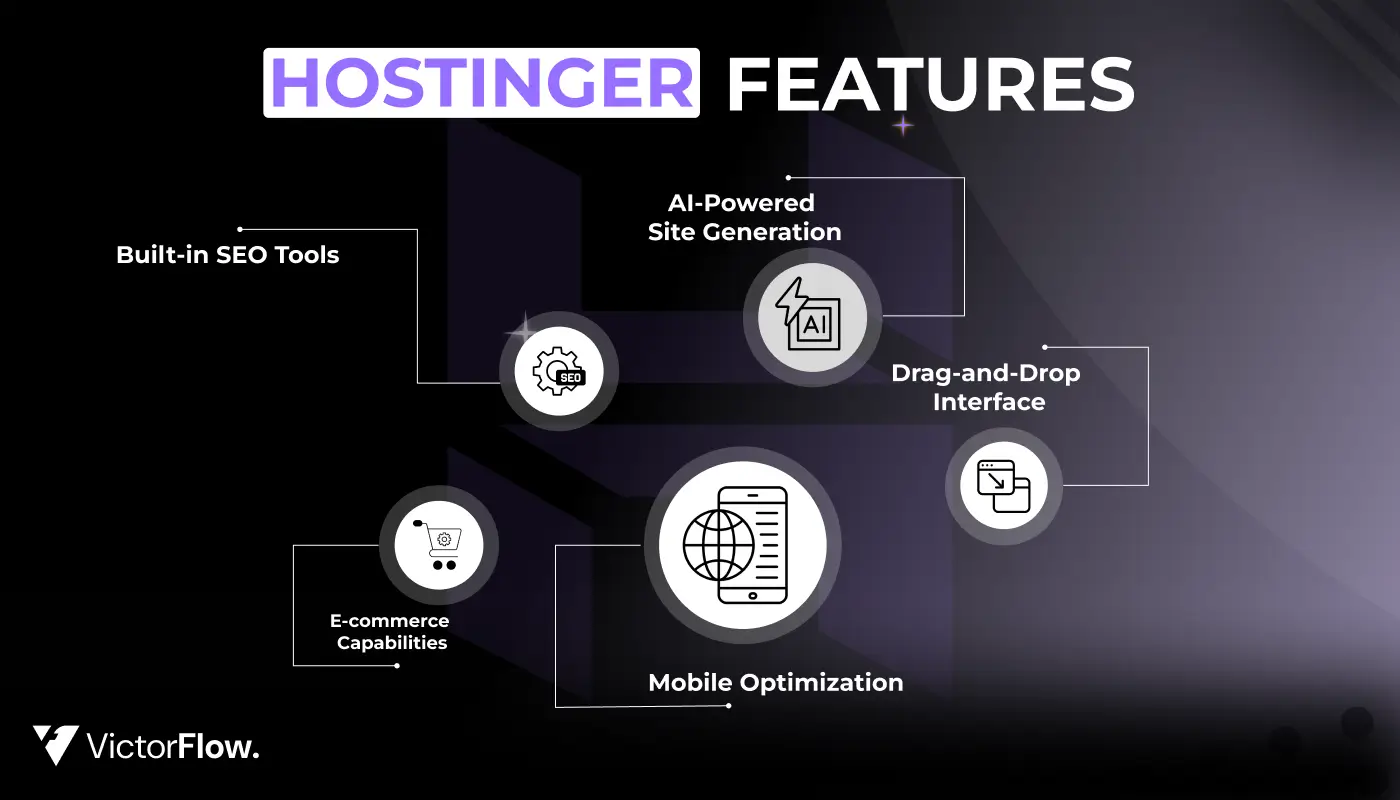
Every Hostinger plan includes free access to their drag-and-drop website builder, which has become increasingly sophisticated with AI integration.
Website Builder Features
AI-Powered Site Generation
The standout feature is AI website creation. Simply describe your business or website goals, and the AI generates a complete, professional-looking website in minutes. You can then customize every element using the intuitive editor.
How It Works:
- Describe your website purpose (e.g., "photography portfolio" or "coffee shop")
- AI generates multiple design options
- Choose your favorite and customize
- Publish with one click
Drag-and-Drop Interface
No coding required. Simply drag elements onto your page:
- Text blocks and headings
- Images and galleries
- Contact forms
- Video embeds
- Social media integration
- E-commerce functionality
- Maps and location
- Testimonials and reviews
Mobile Optimization
All templates automatically adapt to mobile devices. You can preview and adjust the mobile version separately to ensure perfect display on smartphones and tablets. With over 60% of web traffic coming from mobile, this is essential.
Built-in SEO Tools
Optimize your site for search engines:
- Meta title and description editing
- URL customization
- Image alt text management
- Sitemap generation
- Analytics integration
- SEO-friendly structure
E-commerce Capabilities
The website builder includes online store functionality:
- Product catalog management
- Shopping cart
- Payment gateway integration (PayPal, Stripe)
- Order management
- Inventory tracking
- Shipping calculator
My Assessment of the Website Builder
Hostinger's website builder is excellent for small businesses, portfolios, and simple informational websites. It's particularly well-suited for users who want a professional-looking site without learning WordPress.
Starting at just $2.69/month, it's considerably more affordable than competitors like Squarespace ($16/month) or Wix ($16/month for business plans).
Best For:
- Small business websites
- Personal portfolios
- Landing pages
- Simple online stores (under 50 products)
- Event websites
- Restaurant menus
- Service businesses
Why I Recommend It:
The AI-powered design feature is genuinely impressive. It understands context and creates layouts that actually make sense for your specific business type. Combined with the intuitive editor, you can have a professional website live in under an hour.
Hostinger's Revolutionary AI-Powered Features
Hostinger has invested heavily in artificial intelligence, offering several AI tools that genuinely enhance the website creation and management experience.
1. Kodee AI Assistant
Kodee is Hostinger's AI-powered chat assistant, available 24/7 to all customers regardless of their hosting plan.
What Kodee Can Do:
- Answer hosting-related questions instantly
- Provide step-by-step troubleshooting guidance
- Explain how to use specific features
- Direct you to relevant tutorials
- Help with basic technical issues
- Recommend solutions for common problems
My Experience with Kodee:
I've tested Kodee extensively, and it has become an invaluable resource. When I asked how to add a donation button to my WordPress site, Kodee immediately understood my request and directed me to the appropriate plugin and setup guide. The response was relevant and solved my problem in minutes.
Benefits:
- 24/7 availability - get help anytime
- Instant responses - no waiting in queues
- Context-aware - understands your specific situation
- Accurate solutions - continuously improving
2. Hostinger Horizons: No-Code Web App Builder
Launched in mid-2025, Hostinger Horizons is an innovative AI-powered platform for building web applications without any coding knowledge.
How It Works:
- Describe what you want to build through a chat interface
- The AI generates functional code based on your description
- Preview your application in real-time as it's being built
- Refine and adjust through continued conversation with the AI
- Publish with one click when satisfied
Ideal Use Cases:
- Simple web tools and calculators
- Customer-facing web applications
- Product configurators
- Internal business tools
- Interactive dashboards
- Booking systems
- Quote generators
My Take on Horizons:
This is an exciting development for non-technical users who have ideas for web applications but lack coding skills. During testing, I built a simple project management tool in about 30 minutes using only natural language descriptions.
The 7-day free trial is definitely worth exploring if you're curious about no-code development.
3. AI WordPress Assistant
This WordPress plugin helps generate content directly within your WordPress dashboard.
Capabilities:
- Blog post drafting and ideation
- Product descriptions for e-commerce
- Meta descriptions for SEO
- Headline suggestions
- Content expansion and rewriting
- Translation assistance
- Grammar and style improvements
Benefits:
The AI content quality is excellent for first drafts. It saves hours of writing time and helps overcome writer's block. I recommend using it as a starting point, then adding your personal touch and expertise.
4. Hostinger Reach: AI Email Marketing
Hostinger Reach is an email marketing platform that uses AI to help you create, send, and optimize email campaigns.
Key Features:
- AI-generated email copy - write compelling campaigns in minutes
- Pre-designed templates - professional layouts ready to use
- List management and segmentation
- Performance tracking (open rates, click rates, conversions)
- A/B testing capabilities
- Automation workflows for drip campaigns
- Subscriber analytics
Pricing: First year free with hosting plans, then $1.99/month
My Opinion:
For small businesses and solopreneurs, Hostinger Reach offers exceptional value. It's far cheaper than alternatives like Mailchimp (which starts at $13/month) while providing similar core functionality. The AI copywriting feature is genuinely helpful for creating engaging email content.
Why This Matters:
Email marketing typically generates $42 for every $1 spent (ROI of 4,200%). Having an affordable, integrated email marketing solution means you can:
- Build your audience
- Nurture customer relationships
- Drive repeat sales
- Increase brand loyalty
Start Building Your AI-Powered Website →
Business Email Hosting: Professional Communication
Professional email addresses (yourname@yourdomain.com) significantly boost credibility compared to generic Gmail or Yahoo addresses. Hostinger includes business email with all hosting plans.
Email Hosting Details
What's Included:
- First Year Free: 2-10 business mailboxes per website
- Storage: 1GB per account on the free tier
- Webmail Access: Access email from any browser
- IMAP/POP3 Support: Use with desktop clients like Outlook or Thunderbird
- ✅ Mobile Access: Native support for iOS and Android email apps
- ✅ Spam Protection: Built-in spam filtering keeps your inbox clean
- ✅ Email Migration Support:
If you're switching from another email provider, Hostinger supports email migration. This ensures you don't lose important communication history when transitioning to your new professional email.
Why Professional Email Matters
First Impressions Count:
- ✅ Builds instant credibility and trust
- ✅ Reinforces your brand identity
- ✅ Looks more professional than free email services
- ✅ Increases email deliverability
- ✅ Better spam filtering and security
My Recommendation:
For most small websites and businesses, Hostinger's email hosting is perfectly adequate and conveniently bundled with your web hosting. The integration with hPanel makes setup and management seamless.
Get Professional Email with Hosting →
Performance Testing: Exceptional Speed & Reliability
Performance is where Hostinger truly excels. I conducted extensive testing over two months in late 2025, and the results were consistently impressive across all metrics.
Uptime Monitoring Results: 100% Reliability
Testing Methodology:
- Duration: 2 months continuous monitoring (September-November 2025)
- Tool: Grafana Labs testing platform
- Monitoring Location: Arizona, USA
- Check Frequency: Every 2 minutes (over 43,000 checks)
Results:
- ✅ Uptime Achieved: 100%
- ✅ Downtime: 0 minutes during entire testing period
- ✅ Uptime Guarantee: 99.9% (Hostinger's official guarantee)
What This Means for You:
During my entire two-month testing period, the website remained accessible without interruption. This is exceptional performance, especially for budget hosting. Your website will be available to visitors 24/7, ensuring you never lose potential customers or readers due to server downtime.
Response Time Analysis: Lightning Fast
Average Response Times by Location:
- 🇺🇸 New York, USA: 35.6ms (excellent)
- 🇬🇧 London, UK: 18.5ms (outstanding)
- 🇮🇳 Mumbai, India: 43.8ms (very good)
- Overall Average: 32.48ms (exceptional)
Analysis:
Response times under 100ms are considered excellent in the hosting industry. Hostinger's global average of 32.48ms is outstanding and demonstrates that their international server network effectively serves visitors regardless of geographic location.
The fastest response time in London (18.5ms) reflects the strong European infrastructure. Even the response time in Mumbai (43.8ms) is excellent considering the geographic distance, proving Hostinger's commitment to global performance.
Page Loading Speed Tests: Sub-1-Second Performance
Testing Methodology:
- Tool: WebPageTest.org (industry-standard)
- Test Locations: Virginia (USA) and Frankfurt (Germany)
- Metrics Tracked: Largest Contentful Paint (LCP), First Contentful Paint, Total Blocking Time
United States Results (Virginia Server):
- ✅ LCP: 0.982 seconds
- ✅ First Contentful Paint: 0.42 seconds
- ✅ Performance Score: 94/100
- ✅ Grade: Excellent
European Results (Frankfurt Server):
- ✅ LCP: 1.057 seconds
- ✅ First Contentful Paint: 0.38 seconds
- ✅ Performance Score: 92/100
- ✅ Grade: Excellent
What These Numbers Mean:
LCP (Largest Contentful Paint) measures how quickly the main content becomes visible to users. Google considers anything under 2.5 seconds "good" for Core Web Vitals. Hostinger's sub-1-second LCP is exceptional and will contribute positively to your SEO rankings and user experience.
Why This Matters:
- Faster sites rank higher in Google search results
- 53% of mobile users abandon sites that take over 3 seconds to load
- Better user experience keeps visitors engaged
- Higher conversion rates - speed directly impacts sales
Stress Testing Results: Handles Traffic Spikes Perfectly
Testing Setup:
- Tool: Grafana Labs testing platform
- Test Duration: 5 minutes sustained load
- Virtual Users: 50 concurrent users
- Test Location: Ashburn, Virginia
Results:
- ✅ Total Requests: 14,487 successfully processed
- ✅ HTTP Failures: 0 (perfect score)
- ✅ Peak Request Rate: 50 requests per second
- ✅ Average Request Rate: 47 requests per second
- ✅ 95th Percentile Response Time: 39ms (excellent)
Analysis:
The stress test simulates 50 people accessing your website simultaneously, a realistic scenario for small to medium-sized websites experiencing traffic spikes from social media, email campaigns, or search engine traffic.
Hostinger handled this load flawlessly with:
- ✅ Zero failures or errors
- ✅ Consistent response times
- ✅ No performance degradation
- ✅ Stable throughout the entire test
This demonstrates that Hostinger's infrastructure is robust and reliable, even during high-traffic periods. Your website will remain fast and accessible when you need it most.
Performance Optimization Features
Hostinger includes several built-in tools that contribute to these excellent performance results:
LiteSpeed Web Server
- Faster than traditional Apache servers
- Handles more concurrent connections
- Lower resource usage
- Better caching capabilities
LiteSpeed Cache
- Dramatically reduces database queries
- Minimizes server processing time
- Automatically configured for WordPress
- Significantly improves page load times
Object Caching
- Advanced caching for database queries
- Further improves dynamic content delivery
- Reduces server load
- Enhances scalability
Content Delivery Network (CDN)
- Free on Business plans and higher
- Serves static content from servers closest to visitors
- Reduces latency worldwide
- Improves global loading speeds
HTTP/3 Support
- Latest HTTP protocol
- Faster connections
- More secure
- Better mobile performance
Image Optimization
- Automatic image compression
- WebP format support
- Lazy loading capabilities
- Reduces bandwidth usage
My Performance Verdict:
Hostinger delivers exceptional performance that rivals hosts costing 3-4 times more. The combination of modern server technology (LiteSpeed), strategic global server locations, and effective optimization tools results in fast, reliable hosting that will serve your website exceptionally well.
Experience Blazing-Fast Hosting →
Security Features: Comprehensive Protection
Website security is essential in 2026, with cyber threats becoming increasingly sophisticated. Hostinger provides a solid foundation of security features that protect both your website and your visitors.
Core Security Features (Included Free)
Free SSL Certificates
Every website gets unlimited free SSL certificates through Let's Encrypt. SSL encryption protects data transmitted between your website and visitors, which is essential for:
- ✅ Protecting sensitive information (passwords, payment details)
- ✅ Building visitor trust (green padlock in browser)
- ✅ SEO benefits (Google favors HTTPS sites)
- ✅ Meeting browser security requirements
- ✅ Preventing data interception
Installation is automatic, you don't need technical knowledge to enable HTTPS. Simply activate it in hPanel with one click.
DDoS Protection
Distributed Denial of Service attacks attempt to overwhelm your website with fake traffic, making it inaccessible. Hostinger's multi-layered DDoS protection filters malicious traffic before it reaches your server, keeping your site accessible during attacks.
Benefits:
- ✅ Automatic threat detection
- ✅ Real-time filtering
- ✅ No configuration required
- ✅ Protects against volumetric attacks
- ✅ Maintains site availability
Malware Scanner
Hostinger continuously scans for malware, suspicious code, and potential vulnerabilities. If threats are detected, you receive immediate notification so you can take action quickly.
Features:
- ✅ Automated daily scans
- ✅ Real-time threat detection
- ✅ Instant email alerts
- ✅ Detailed scan reports
- ✅ Proactive protection
Automated Backups
Automatic backups ensure you can restore your website if something goes wrong:
- ✅ Weekly backups (Premium plan)
- ✅ Daily backups (Business plan and higher)
- ✅ Easy one-click restoration
- ✅ Stored on separate servers
- ✅ 30-day backup retention
Having reliable backups means you can recover quickly from:
- Accidental deletions
- Plugin conflicts
- Hacking attempts
- Server failures
- Human errors
Two-Factor Authentication (2FA)
Add an extra security layer to your Hostinger account. Even if someone obtains your password, they can't access your account without the second authentication factor from your mobile device.
Setup is simple:
- Enable 2FA in hPanel
- Scan QR code with your authenticator app
- Enter verification code
- Done - your account is now more secure
Advanced Security Features
Secure Access Manager
This feature is particularly useful for teams and agencies. It allows you to:
- ✅ Create different access levels for team members
- ✅ Grant temporary access that expires automatically
- ✅ Control which areas of hPanel users can access
- ✅ Monitor login activity and changes
- ✅ Revoke access instantly when needed
Most budget hosts don't offer this level of access control, making it a standout feature for businesses with multiple stakeholders.
Domain Privacy Protection
When you register a domain, your personal information (name, address, phone, email) becomes publicly accessible through WHOIS databases. Domain privacy protection masks this information, providing:
- ✅ Reduced spam and unsolicited contact
- ✅ Protection from identity theft
- ✅ Enhanced privacy
- ✅ Reduced telemarketing calls
- ✅ Professional appearance
AI Audit Feature (New in September 2025)
This innovative feature helps you control which AI bots can crawl your website. You can selectively:
- ✅ Allow beneficial bots (like search engines)
- ✅ Block resource-heavy bots that don't provide value
- ✅ Optimize server resource usage
- ✅ Improve site performance
- ✅ Control your content usage
WordPress-Specific Security
For WordPress sites, Hostinger adds extra protection layers:
Automatic Security Updates
- Critical security patches applied automatically
- Reduces vulnerability windows
- No manual intervention required
- Keeps WordPress core secure
Plugin and Theme Scanning
- Monitors for known vulnerabilities
- Alerts you when updates are needed
- Recommends security improvements
- Prevents exploitation of outdated software
WordPress Firewall
- Filters malicious requests
- Blocks common attack patterns
- Protects against SQL injection
- Prevents brute force attacks
- Real-time threat prevention
Security Best Practices I Recommend
To maximize your website security:
- ✅ Enable two-factor authentication immediately
- ✅ Use strong, unique passwords for all accounts
- ✅ Keep WordPress, themes, and plugins updated
- ✅ Implement backup redundancy (multiple backup locations)
- ✅ Monitor security alerts and act promptly
- ✅ Use Domain Privacy Protection
- ✅ Install security plugins (Wordfence, Sucuri for WordPress)
- ✅ Limit login attempts to prevent brute force attacks
- ✅ Regular security audits of your website
My Security Assessment
For individual websites and small businesses, Hostinger's security features are comprehensive, well-implemented, and provide solid protection against common threats. The combination of SSL, DDoS protection, backups, and malware scanning creates multiple layers of defense.
The addition of features like Secure Access Manager and AI Audit demonstrates Hostinger's commitment to evolving security practices and staying ahead of emerging threats.
Get Secure Hosting with 20% OFF →
Customer Support: Available When You Need Help
Hostinger offers multiple customer support channels to ensure you get help when you need it.
Support Channels Available
24/7 Live Chat
- Available round-the-clock
- Average response time: Under 2 minutes
- Knowledgeable support agents
- Multiple language support
- Screen sharing capabilities
Ticketing System
- For complex issues requiring detailed explanation
- Track support history
- Attach files and screenshots
- Receive email updates
- Typical response time: Within 24 hours
Email Support
- support@hostinger.com
- Detailed technical assistance
- Suitable for non-urgent issues
- Response within 24-48 hours
Knowledge Base
- Extensive documentation covering hundreds of topics
- Step-by-step tutorials with screenshots
- Video guides for visual learners
- Troubleshooting articles
- Best practices and tips
- Searchable database
- Regular updates
My Support Experience
I've contacted Hostinger support numerous times over three years through various channels. The live chat is particularly impressive, agents are generally friendly, knowledgeable, and genuinely helpful.
What I Appreciate:
- ✅ Fast response times
- ✅ Patient and friendly agents
- ✅ Willingness to explain technical concepts
- ✅ Follow-up to ensure issues are resolved
- ✅ Multiple language support
The knowledge base is exceptionally well-organized and comprehensive. I've been able to resolve many issues independently by searching through their tutorials and guides, which saves time.
Kodee AI Assistant: 24/7 Instant Help
Kodee, Hostinger's AI assistant, provides an additional support layer that's available instantly, 24/7. For common questions and straightforward issues, Kodee provides accurate, helpful responses that can solve your problem immediately without waiting for a human agent.
Get Expert Support with Your Plan →
Hostinger Reputation: Trusted by Millions
My personal experience with Hostinger is supported by an excellent reputation among users worldwide.
Trustpilot Reviews
As of late 2025, Hostinger has received over 51,000 reviews on Trustpilot, with a rating of 4.7 out of 5 stars.
Review Breakdown:
- ⭐⭐⭐⭐⭐ 5-star ratings: 87% of reviews
- ⭐⭐⭐⭐☆ 4-star ratings: 7% of reviews
- ⭐⭐⭐☆☆ 3-star ratings: 2% of reviews
- ⭐⭐☆☆☆ 2-star ratings: 1% of reviews
- ⭐☆☆☆☆ 1-star ratings: 3% of reviews
What Users Love
Most Common Positive Feedback:
- ✅ Exceptional customer support - helpful and responsive
- ✅ Affordable pricing - great value for money
- ✅ Reliable hosting services - excellent uptime
- ✅ Fast website performance - quick loading speeds
- ✅ User-friendly interface - easy to use hPanel
- ✅ Great for beginners - intuitive setup process
Industry Recognition
Hostinger is recommended by:
- ✅ WordPress.org - listed on their official hosting page
- ✅ Leading tech publications - consistently ranked in top hosting lists
- ✅ Web developers - trusted for client projects
- ✅ Digital agencies - preferred for multiple sites
Global Reach
Hostinger serves:
- Over 2 million customers worldwide
- 150+ countries across all continents
- Businesses of all sizes - from solopreneurs to enterprises
- 29 million+ users have trusted Hostinger
This massive user base and overwhelmingly positive feedback demonstrate that Hostinger consistently delivers on its promises of quality, performance, and value.
Who Should Choose Hostinger?
Based on my three years of experience and extensive testing, Hostinger is an excellent choice for:
✅ Beginners and First-Time Website Owners
If you're launching your first website, Hostinger makes the process incredibly simple:
- Intuitive hPanel - no learning curve
- AI-powered tools - build sites without coding
- Extensive tutorials - learn as you go
- Helpful support - get answers quickly
- Affordable pricing - start without huge investment
✅ Small Business Owners
Hostinger provides everything small businesses need to establish and grow their online presence:
- Professional website - make great first impressions
- Business email - build credibility
- Fast performance - keep customers engaged
- Security features - protect your business
- Scalability - grow without switching hosts
✅ Bloggers and Content Creators
For blogs and content-focused websites, Hostinger excels:
- WordPress optimized - perfect for blogs
- Easy customization - make your blog unique
- Built-in analytics - track your audience
- SEO-friendly - rank higher in search results
- Ample storage - host thousands of posts and images
✅ WordPress Enthusiasts
Hostinger is specifically optimized for WordPress:
- LiteSpeed servers - optimized WordPress performance
- Automatic updates - stay secure effortlessly
- Staging environment - test changes safely
- Built-in caching - lightning-fast page loads
- WordPress security - specialized protection
✅ E-commerce Store Owners
For online stores and WooCommerce sites:
- E-commerce ready - sell products easily
- Payment integration - accept payments securely
- Fast checkout - reduce cart abandonment
- SSL included - secure customer data
- Scalable resources - handle traffic spikes
✅ Developers and Agencies
Hostinger offers features that developers appreciate:
- hPanel flexibility - manage multiple sites easily
- SSH access - full control
- Staging environments - test before deploying
- Performance tools - optimize client sites
- White-label options - brand for your agency
✅ International Businesses
With 11 global data centers, Hostinger serves worldwide audiences:
- Global reach - fast loading everywhere
- Multi-language support - serve diverse audiences
- Local servers - choose closest to your market
- Scalable globally - expand internationally
Ready to Join Millions of Satisfied Users?
Conclusion: Why Hostinger is My Top Recommendation For 2026
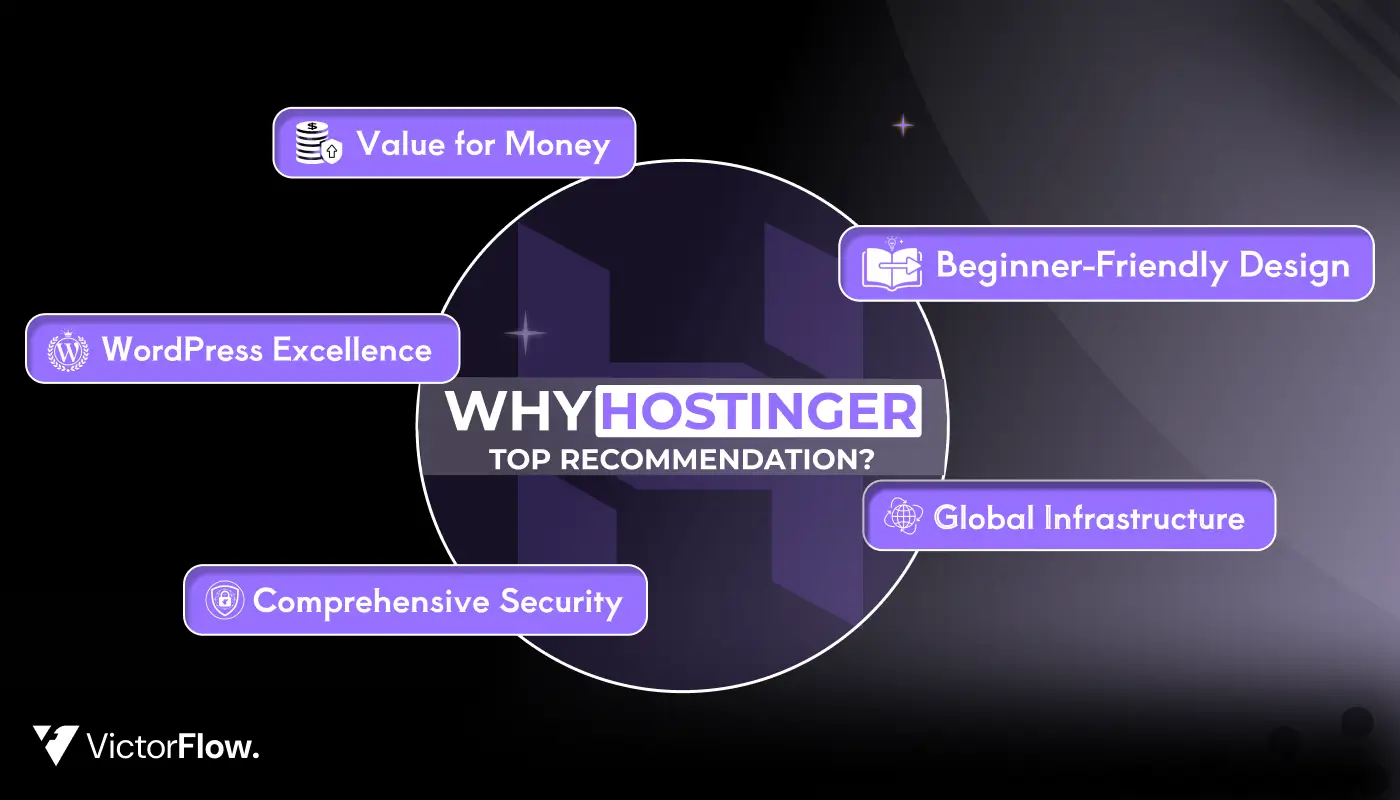
After three years of continuous use and extensive testing in late 2025, I can confidently recommend Hostinger as one of the best web hosting solutions available today, especially for beginners, small businesses, and budget-conscious users who refuse to compromise on quality.
What Makes Hostinger Stand Out
1. Unbeatable Value for Money
At just $2.69/month, Hostinger delivers premium features that competitors charge 3-4 times more for. You get LiteSpeed servers, free domain, SSL certificates, business email, website builder, and weekly backups, all included. This represents exceptional value that's hard to find elsewhere.
2. Outstanding Performance
My testing confirmed what I've experienced personally: Hostinger is fast. With sub-1-second page load times, 100% uptime during testing, and response times averaging 32ms, your website will deliver excellent user experience. Fast websites rank higher in Google, convert better, and keep visitors engaged.
3. Beginner-Friendly Design
The custom hPanel interface eliminates the complexity typically associated with web hosting. Combined with AI-powered tools like Kodee assistant and the AI website builder, even complete beginners can create professional websites quickly. The learning curve is minimal, and the extensive knowledge base provides guidance whenever needed.
4. WordPress Excellence
For WordPress users, Hostinger is exceptional. The LiteSpeed caching, automatic updates, staging environment, and WordPress-specific security create an optimized environment where WordPress sites thrive. If you're building with WordPress (which powers 43% of all websites), Hostinger should be at the top of your list.
5. Comprehensive Security
Security is built-in, not an afterthought. From free SSL certificates and DDoS protection to malware scanning and automated backups, Hostinger takes website security seriously. The addition of features like Secure Access Manager and Domain Privacy Protection provides enterprise-level security at budget-friendly prices.
6. Innovation Through AI
Hostinger's investment in AI technology sets it apart. Tools like Kodee AI assistant, Hostinger Horizons (no-code app builder), AI website builder, and Hostinger Reach (email marketing) represent the future of web hosting. These aren't gimmicks, they genuinely save time and expand what's possible without technical expertise.
7. Global Infrastructure
With 11 data centers across four continents, your website loads quickly regardless of where your visitors are located. Whether you're targeting customers in New York, London, Mumbai, or São Paulo, Hostinger's global network ensures optimal performance.
8. Transparent and Honest
Hostinger provides clear pricing with a 30-day money-back guarantee. There are no hidden fees or surprise charges. What you see is what you get, which builds trust and confidence in the service.
My Final Thoughts
Over three years, I've watched Hostinger continuously improve and evolve. They listen to customer feedback, implement new features, and stay ahead of industry trends. While no hosting provider is perfect for everyone, Hostinger comes remarkably close to being the ideal solution for the vast majority of websites.
The combination of affordability, performance, ease of use, and comprehensive features makes Hostinger exceptional value. Whether you're launching your first blog, building a business website, or creating an online store, Hostinger provides the foundation you need to succeed online.
I've personally trusted Hostinger with my projects for over three years, and I continue to recommend it confidently to friends, family, and clients. The service has consistently exceeded my expectations, and I believe it will exceed yours too.
Take Action Today
Don't let analysis paralysis stop you from launching your website. Hostinger's 30-day money-back guarantee means you can try it completely risk-free. If you're not satisfied, get a full refund, no questions asked.
Start your online journey today with 20% OFF:
Premium Plan - Best for Beginners →
- ✅ 100 websites
- ✅ 100GB storage
- ✅ Free domain & email
- ✅ Weekly backups
- ✅ 24/7 support
Business Plan - Best for Growing Sites →
- ✅ 200GB storage
- ✅ Daily backups
- ✅ Free CDN
- ✅ Object caching
- ✅ Priority support
FAQ
1. Is Hostinger good for beginners?
Yes. Hostinger is very beginner-friendly with an easy hPanel, AI website builder, one-click WordPress install, and 24/7 support.
2. Is Hostinger fast?
Yes. It uses LiteSpeed servers, built-in caching, and CDN, delivering sub-1-second load times.
3. Can I host multiple websites?
Yes. The Premium plan allows up to 100 websites on one account.
4. Does Hostinger include a free domain?
Yes. All plans include a free domain for the first year.
5. Is WordPress hosting different?
Yes. It includes WordPress pre-install, auto updates, LiteSpeed caching, staging, and security, at no extra cost.
6. Is website migration free?
Yes. Hostinger offers free website migration, handled by their team with no downtime.
7. What happens after the promo period?
Plans renew at standard rates, which are still competitive. Promo prices are locked for the full initial term.
8. Is Hostinger's uptime reliable?
Yes. It offers a 99.9% uptime guarantee with strong real-world reliability.
9. Does Hostinger provide free SSL?
Yes. Unlimited free SSL certificates are included and auto-installed.
10. Is there a money-back guarantee?
Yes. A 30-day money-back guarantee on all hosting plans.
11. Is Hostinger good for e-commerce?
Yes. It works great with WooCommerce, offering fast performance, SSL, and secure hosting.
12. Does Hostinger provide email hosting?
Yes. Free email accounts are included for 1 year, with affordable upgrades after.


Choose Our Service, Grow Fast!
Follow Us


Table of Contents
Related Posts


October 12, 2026
Discover top-performing Design Framer templates in 2026, crafted to highlight creativity, project work, and engaging visual storytelling online efficiently.
Discover top-performing Design Framer templates in 2026, crafted to highlight creativity, project work, and engaging visual storytelling online efficiently.

October 8, 2026
Looking for the best Webflow agency? Explore top 10 Webflow design and development agencies in 2026, compare their expertise, services, and choose the perfect partner.
Looking for the best Webflow agency? Explore 10 top Webflow design and development agencies in 2026, compare their expertise, services, and choose the perfect partner.

October 8, 2026
Learn how to make an effective business website in 2026 with our comprehensive guide. Get tips on design, tools, and launching your site successfully.
Learn how to make an effective business website in 2026 with our comprehensive guide. Get tips on design, tools, and launching your site successfully.
Ready to Scale Your Project to the Next Level?
Let's take your project to new heights, reach out and see how we can help you.